
5 Quick and Easy Outlook tips
I’m always looking for ways to use my software, especially Outlook, more effectively. Here’s a few of my favorites: Outlook Tip #1: Was an important


I’m always looking for ways to use my software, especially Outlook, more effectively. Here’s a few of my favorites: Outlook Tip #1: Was an important
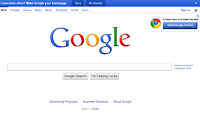
Do you Google all the time like we do? Don’t like clicking the Next button to see the next 10 results? You can bypass this

Recently, a colleague sent me an Excel spreadsheet with the first column (Column A) hidden. It took me a few minutes to realize what was
Have you ever needed to gather the opinion or responses from some of your colleagues for an activity, event or other that is going on

Save time packing power equipment for your phone or laptop, but two identical adapters or consider an iGo as your traveling companion. I have an
Our computers are being hijacked, and we may not even know it! The term “hijack” means to illegally seize in transit and force to a
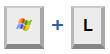
Have you ever wanted to quickly lock your computer? Perhaps for privacy, perhaps it’s part of your corporate security policy or in my case, to

Here’s the last installment of our Windows keyboard shortcuts. Move windows: One of Windows 7’s best features, you can snap a window to the

Here’s some less common but still very useful keyboarding shortcuts. Function keys: Press one of these keys at the top of your keyboard to quickly
These too have been around the block but are often forgotten Working with Windows: Windows system shortcuts CTRL+ALT+Delete: Bring up the Windows Task Manager ALT+Tab: